Musikcube
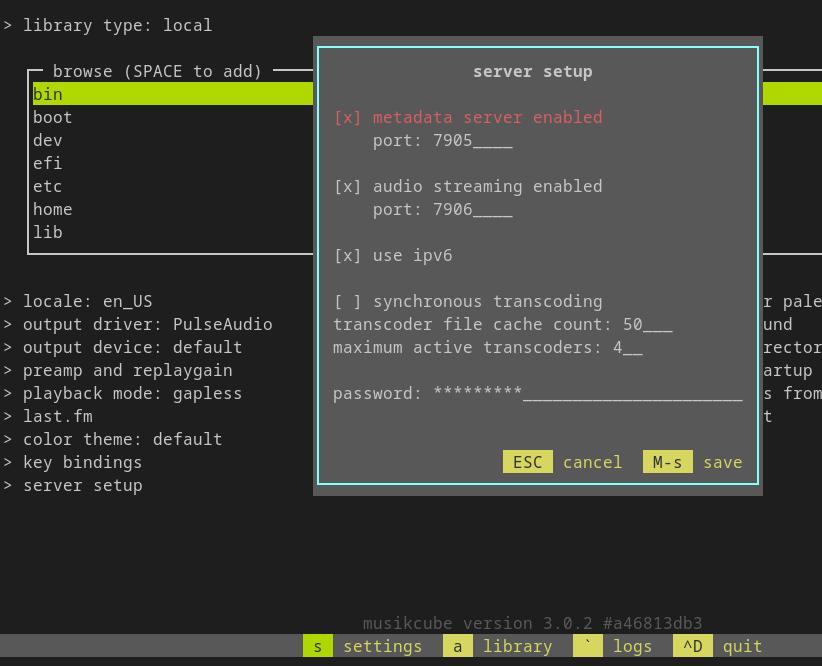
In order to use Musikcube configure it to accept websocket connections in server setup:
- Enable the Metadata Server
- Set a Password
Both of these settings are found in Musikcube -> (s)ettings -> server setup
The URL used by MS has the syntax:
[ws|wss]://HOST:[PORT]
The port is the same as shown in the server setup screenshot from above, under metadata server enabled. If no port is provided to MS it will default to 7905.
If no URL is provided to MS it will try to use ws://localhost:7905
Configuration
- ENV
- File
- AIO
This is configuration for the ENV Config Type.
| Environmental Variable | Required? | Default | Description |
|---|---|---|---|
MC_URL | No | ws://localhost:7905 | Use port set for metadata server |
MC_PASSWORD | Yes |
Config Structure
This displays the structure of the File Configuration for a musikcube type Source with all possible properties, their shape, and descriptions/types. Use this to understand how to write a valid config.
Config Example
This displays an example config file of a musikcube Source File Configuration that adheres to the shown Config Structure.
- text mode lets you edit the JSON directly.
- tree mode gives you a guided point-and-click editing experience that always keeps the JSON syntax valid.
Both modes validate that the configuraion is correct. Any errors show up as squiggly lines.
After you finish editing, switch to text and then copy all text to get a completed config.
Config Example Mobile Experience
This displays an example config file of a musikcube Source File Configuration that adheres to the shown Config Structure.
The example config file editor is meant for a larger screen experience so only the read-only example is shown. Please use this site on a tablet/laptop/desktop to enable file editor features.
[
  {
    "type": "musikcube",
    "enable": true,
    "name": "musikcube",
    "data": {
      "url": "ws://localhost:7905",
      "password": "MY_PASSWORD"
    }
  }
]
Config Structure
This displays the structure of the all-in-one (config.json) configuration with all possible properties, their shape, and descriptions/types. Use this to understand how to write a valid config.
Select the musikcube type from the respective sources node below, then expand it.
Config Example
This displays an example config file of a all-in-one (config.json) configuration that includes a musikcube Source that adheres to the shown Config Structure.
- text mode lets you edit the JSON directly.
- tree mode gives you a guided point-and-click editing experience that always keeps the JSON syntax valid.
Both modes validate that the configuraion is correct. Any errors show up as squiggly lines.
After you finish editing, switch to text and then copy all text to get a completed config.
Config Example Mobile Experience
This displays an example config file of a all-in-one (config.json) configuration that includes a musikcube Source that adheres to the shown Config Structure.
The example config file editor is meant for a larger screen experience so only the read-only example is shown. Please use this site on a tablet/laptop/desktop to enable file editor features.
{
  "sources": [
    {
      "type": "musikcube",
      "enable": true,
      "name": "musikcube",
      "data": {
        "url": "ws://localhost:7905",
        "password": "MY_PASSWORD"
      }
    }
  ]
}